A round-up of 10 of the best tutorials for using, managing and creating Adobe Photoshop brushes.
 French Kiss Collections, photography and design resources and tutorials
Fine Art and Grunge textures for Photoshop and Photography
French Kiss Collections, photography and design resources and tutorials
Fine Art and Grunge textures for Photoshop and Photography

A round-up of 10 of the best tutorials for using, managing and creating Adobe Photoshop brushes.
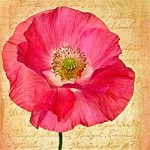
Learn how easy it is to change colors and opacities of the French Kiss Script and Edge Overlays with this video and tutorial on using solid color adjustment layers and clipping masks in Photoshop and Elements. Besides, it’s just a really cool technique to know.
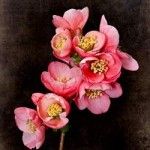
Sure, we all use the Multiply, Overlay, Soft Light and maybe even Hard Light blend modes all the time. Here’s an example of how one of the lesser used blend modes can save you masking time.

Fairly advanced Photoshop tutorial showing step by step details to create this painterly Camellia image. The image uses a texture and 3 filters, 2 Topaz Labs filters and the Pixel Bender Oil Paint filter. Also uses layer adjustments, clipping masks, and layer masks.

Sometimes it can be useful to lighten the center of a texture to give a vignetted effect to the edge. I tell you how here and give you a free download.

Creating a Weimaraner Puppy Photo Illustration from a snapshot using Adobe Photoshop and Corel Painter.
Learn my “Secret Sauce” ingredient for using textures on a black background.

See how to use several different methods to create layer masks, plus get a free texture download.

How to quickly turn your layer mask on and off in the layer panel.
Tips on how to get started making your own textures.